
The whole thing in one line: register with an email address, put the referral code in during signup, turn on two-factor authentication, submit your identity documents, and only then think about funding. Creating an account and completing verification are separate steps; check the current status and timing shown for your application. Document clarity and matching name fields are useful checks before submitting.
Three things to settle before you start
Start with an accepted identity document, a personal email address and your actual country of residence. The country choice affects the services available; the form should reflect your circumstances.
The third one is worth dwelling on, because it is the one people click past. The country or residence you select determines which fiat rails you see, which products are open to you, and which compliance regime applies. Plenty of people pick something at random, discover months later that a feature they want is unavailable, and only then learn that changing it means resubmitting documents and waiting on a manual review.
Prepare the document types listed in the current flow. Do not assume a passport has a better acceptance rate than a local identity card. Kazakhstan onboarding may offer an IIN route, depending on your circumstances and the current entry point. Foreign residents should follow the accepted-document and address-evidence requirements using their own genuine details.
On email: do not use a work address. It sounds like a small thing. Access to a work mailbox is controlled by the employer; losing it after a job change can create an additional account-recovery problem. Use something of your own that will persist, and put two-factor authentication on that mailbox too — it is the last door into your account.
One more thing worth deciding up front: what you actually want this account for. Holding a modest USDT balance for cross-border payments and actively trading are different needs with different exposure. The first requires very little to be switched on, and a simpler account is an easier account to keep safe. A lot of people enable everything on day one and end up exposed to a pile of risks they were never going to use.
If you fall into the first group — most readers here do — you need exactly three capabilities: fund it, hold, and get money out. Leave the rest alone.
If you have not yet decided between the global platform and the locally licensed Binance entity in Kazakhstan, read how the two differ before registering. They are not one account system, and thinking it through first is much cheaper than migrating later.
One more thing that belongs before signup: check the platform's regulatory status
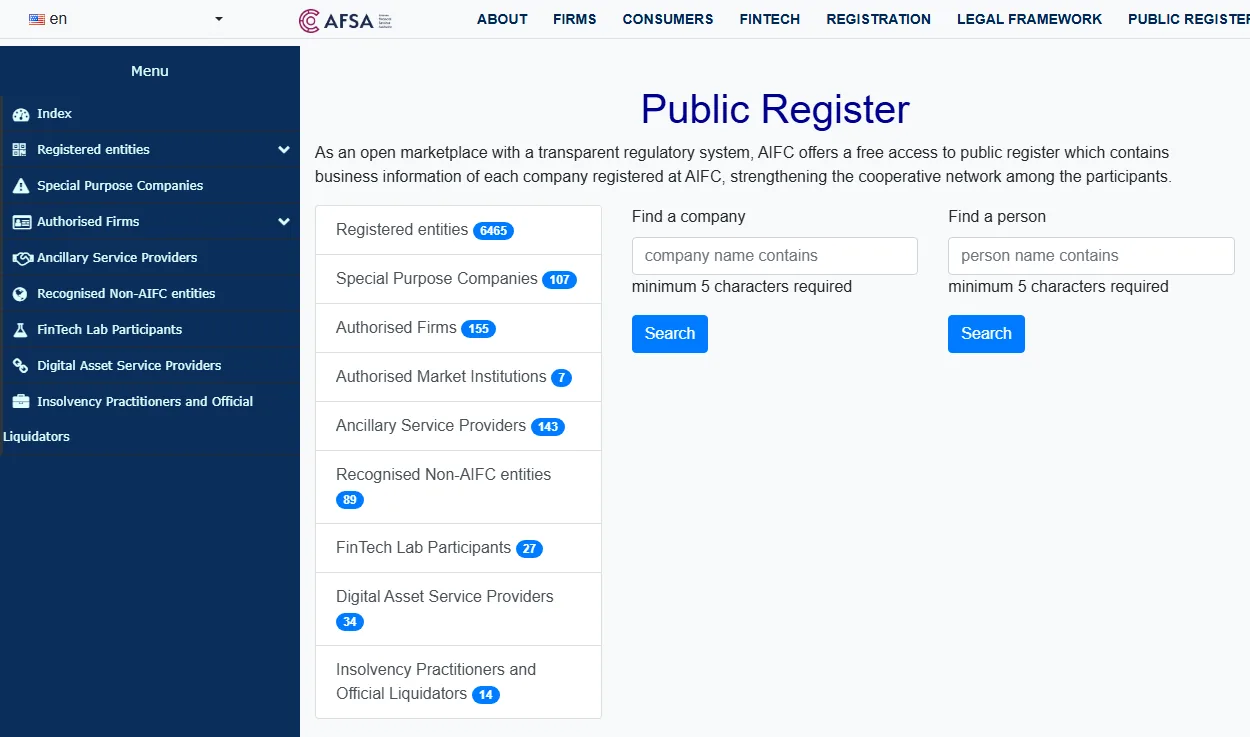
Most guides leave this out, and it belongs ahead of everything else. On 29 April 2026 AFSA published a public warning: organising the circulation of digital assets within Kazakhstan without the appropriate licence is prohibited, and the notice named several platforms marketing locally without one. The same notice's practical advice to users was to check a platform's regulatory status in the AFSA public register before using it, and to refrain from transferring funds or digital assets to entities whose regulatory status is unclear.
To be precise: what is prohibited is a platform operating without authorisation, not you using one, and there is currently no provision aimed at individual users. But "not a criminal offence" and "the regulator is content with it" are different things — and this check is the part you can do yourself.
How: ignore "regulated" or "fully compliant" on the platform's own page, which carry no legal weight. Open the AFSA public register and search the full legal name of the contracting entity from the top of the terms of service — not the brand — then read four columns: does the entity name match, does the permission type cover what you want to do, is the status current, and are conditions attached. The full method is in checking an AFSA licence, and the checklist tool generates the list to work through.
This is one of the few things in this industry you can verify independently. Most claims you cannot check — how much is in reserve, how good the security is — you can only decide whether to believe. "Does this authorisation exist" has a findable answer. When an answer is findable, do not guess.
Signing up, step by step
The registration page itself is one input and one button. This is what it looks like:
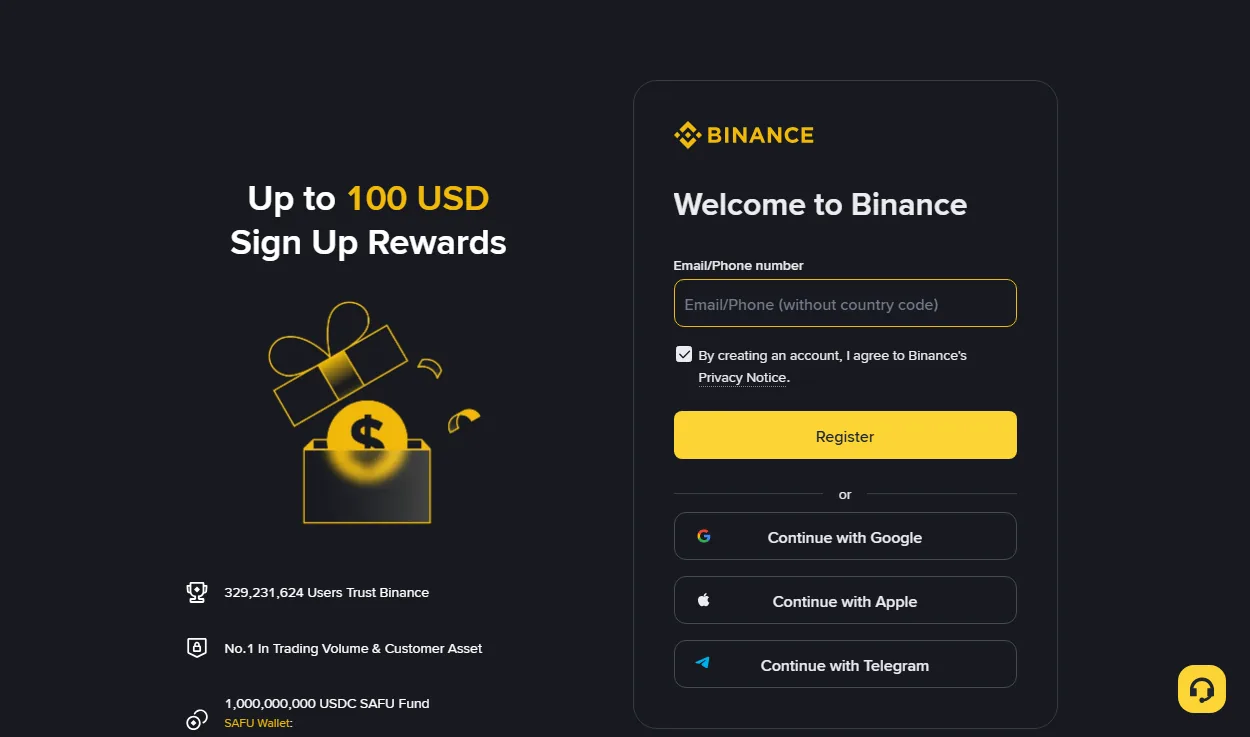
- Enter your email. The field takes a phone number too. Use the email, for the reasons above.
- Set a password. Generate it in a password manager and do not reuse one from elsewhere. Crypto accounts are a priority target for credential stuffing, and reuse is the single most common way people lose them.
- Enter the referral code. Position and behaviour are covered in the next section — it is usually behind a collapsed field, which is why so many people skip past it.
- Confirm the verification code and finish.
On the third-party sign-in options (Google, Apple, Telegram): they work, but I would not. Signing in through another account ties the security of your crypto account to the security of that account, which adds a link you do not control. Email, password and an authenticator app is a shorter, clearer chain.
One habit worth building: reach the signup page by typing the address yourself or from a link you trust. Not from a promoted search result, not from a forwarded short link, and never through anything that asks you to install a "helper" first. Cloned sites can be pixel-perfect, and every character you type on one is captured. Checking the domain in the address bar is the simplest and most effective security measure there is.
Where the referral code goes, and whether it can be added later
The code sits in the signup form, usually behind a collapsed "Referral ID" field you have to expand. It has to go in at the moment the account is created — in most cases it cannot be attached afterwards.
This is the most practically useful line in the guide, because it is irreversible. A fee discount is not life-changing money, but over sustained use it is not nothing either, and there is no way back once the account exists.
So before you press create, expand the form, read down it, and confirm the field is open and filled. If you arrive through a link that carries the code, it is normally pre-filled — but check it anyway. Autofill can be dropped by browser settings, privacy extensions or a redirect along the way.
INVITE CODE
If you are entering it by hand, this is the one.
How the fee discount actually works
This gets discussed as though it were mysterious. The mechanism is simple: the code establishes an attribution relationship, the platform shares part of the trading fee it was already charging with the referrer, and the referrer can pass part of that back to you. So the discount comes out of a fee that already existed — it is not an extra charge placed on you. That is why signing up with a code does not cost you more.
What has to be said clearly is that the proportion is not fixed. Platforms adjust it by campaign, account tier and product. What you actually receive on any given day is whatever your Binance account shows. Any source that states it as a hard number — or promises it is permanent — is not reliable.
And it applies to fees, not to outcomes. If your trading loses money, saving something on fees does not change that. Treating a fee discount as the main reason to open an account has the priorities backwards.
Identity verification: documents and the usual sticking points
You normally need three things: photographs of the physical document (not a photocopy, not a scan, no glare, nothing covered), a selfie or liveness check, and in some cases proof of address. The overwhelming majority of rejections come from the first.
The document photo requirements look fussy and every one of them really does cause rejections:
- All four corners in frame. Missing one invalidates it. People photograph documents against a table edge and clip a corner without noticing.
- No glare. Passport laminate reflects badly under overhead light. Move so the light comes from the side.
- No fingers over the document, including the border. Lay it flat rather than holding it.
- Not a photo of a screen. Photographing a scan displayed on a monitor is generally detected and refused.
- Sharp throughout, especially the machine-readable lines at the bottom. Blurred there means no automated check.
Then consistency, which is the second big one. Match the surname and given-name fields to the corresponding fields on your document, including spelling and middle names where requested. A display that puts the given name first does not mean you should swap the inputs. Check the form labels and instructions, especially when using a transliterated name.
For the selfie or liveness step: find even light (not backlit, no overhead light casting shadows), take off glasses and hats, show your whole face, and move slowly when prompted. Failures here are usually environmental rather than about you — moving to a different spot and retrying often clears it.
Do not give a person in a chat your password, verification code, seed phrase or private key. A genuine official signup or verification form may ask you to enter a code yourself. Verify the website or app first. This does not authorise a supposed helper to take control of your account.
On proof of address, which readers in Kazakhstan ask about often: whether it is required, and what is accepted, depends on the country you selected and the features you want, and platform requirements change — so no hard list here. When it is needed, what is generally accepted is a recent utility bill, bank statement or official residence confirmation showing your name, address and a date. A tenancy agreement is sometimes refused because it is not issued by a third party.
Phone or computer for this step
Phone, generally. The reason is practical: phone cameras are markedly better than most laptop front-facing cameras, and this step lives or dies on image quality. Liveness checks also run more smoothly on a phone, where you avoid permission, resolution and frame-rate problems.
There is one exception. If your document is unusual, or you have already failed a few times, uploading from a computer using photographs you took and inspected beforehand gives you more control — you can zoom in and confirm every corner and every line before submitting, rather than shooting and sending in one motion.
If the official form accepts uploaded files, photos can be taken on a phone and checked at a larger size on your own trusted computer. Inspect sharpness and obstruction before submitting through the official process; do not send identity documents to an intermediary.
Three settings to do the same day
Start with two-factor authentication, the withdrawal address whitelist and an anti-phishing code. Check the current security settings and save recovery options. They address different threats; none replaces checking each action yourself.
One: use an authenticator app, not SMS
SMS codes look convenient, but in a cross-border context they have two problems: you may not receive them while roaming or after changing numbers, and SIM-swap attacks are real. An authenticator app generates codes without depending on a phone number.
When you set it up there is a backup key printed under the QR code. Write it down and store it offline. If you lose or replace the phone, that string is your only route back. A screenshot stored on the same phone is not a backup.
Two: whitelist withdrawal addresses
With this on, assets can only go to addresses you added in advance. Even somebody holding your account cannot send coins to their own address — they would have to add one first, and adding one triggers extra verification and a waiting period. That delay is your opportunity.
It is off by default. You have to go and turn it on. Check whether it is available and enabled in your own account before relying on it.
Three: an anti-phishing code
Look for Anti-Phishing Code in the security settings. You choose a phrase to help identify Binance emails; it is not a separate withdrawal password. Its presence alone is not a reason to follow a link. Check the sender and open the official app yourself for account actions. Availability and covered messages depend on the current instructions.
For the current entry point, see Binance’s anti-phishing code instructions, checked September 2026.
Two more that cost nothing
Turn on login notifications. New device and unusual location alerts. The value is not prevention but speed of detection — in account security, how fast you notice often determines the size of the loss more than how strong the defences were.
Check the API key list. If you have never used the API it should be empty. If it is not, something was created without your knowledge: delete it and change everything. New accounts rarely have this problem, but building the habit of glancing at it costs nothing.
The fuller picture — when to move assets off an exchange, how to store a seed phrase — is in the self-custody guide.
A small sequencing suggestion: set up two-factor authentication before you submit verification. Once verification clears, account capabilities open up, and if your security settings are not in place yet there is a window in between. Neither order is mandated, but security first is the steadier one.
Why verification gets rejected
Everything above plus a few more, as a table to work through when you get bounced:
| What you see | Usual cause | What to do |
|---|---|---|
| Fails immediately on submit | File format or size | Use an ordinary JPG, not an odd export from a screenshot tool |
| Document not recognised | Glare, blur, clipped corner, photo of a screen | Flat on a table, light from the side, reshoot |
| Information does not match | Name spelling or order differs from the document | Copy the document exactly, including spacing |
| Liveness check keeps failing | Backlight, glasses, moving too fast | Even light, glasses off, slow down |
| No progress for a long time | In a manual queue | Check the expected time and any document requests; contact support with the original application record if overdue |
| Document already in use | You registered before | Use account recovery, do not open a second account |
That last row deserves emphasis. When people see "this document is already registered", the reflex is to try a different document, or somebody else's. Do not. Using another person's identity documents is a problem under both platform rules and local law, and once detected both accounts can be restricted. A forgotten password or a dead mailbox both have proper recovery routes — use them.
Another common case: the page keeps spinning or says "try again later". Save the status, check the connection and platform notices, and establish whether the application was submitted. Repeated clicks are not a progress indicator. Whether they create another application depends on the flow. If the displayed review window has passed, give official support the submission time and exact message.
If your problem is repeated failure specifically, there is a symptom-by-symptom guide.
Once you are verified, do not rush to fund it
Having an account does not mean you should put money in it. Two things first: run a trivially small amount all the way through the chain, and understand the rules that apply to getting money in where you are. Until you have done both, a large deposit is a bet on a process you have not tested.
Run the small one first
All the way through: fund a small amount, convert it, take it back out, and watch it land in your account. Pick a figure you would genuinely not care about losing.
The value is that you meet every surprise while the stakes are irrelevant: a step wanting extra verification, a new-account limit, a withdrawal that takes longer than expected, fees that do not match your arithmetic. You will meet these eventually. The only question is whether your balance is small or substantial when you do.
Consider a hypothetical funding attempt: the trading account is in your name but the card belongs to a family member. A channel requiring matching names may reject or review that payment. Check the actual channel requirements; a small amount does not replace that check.
Understand the funding leg where you are
Moving money from a local bank into an exchange is the most rule-dense leg of the whole chain, and the one most likely to cause trouble — it is governed simultaneously by platform rules and by your bank's controls, and you cannot see the latter.
In Kazakhstan the common route is buying USDT with tenge over P2P, which local bank rails generally support. That is also where card-freezing risk concentrates, and that guide has specific things you can do about it. The reverse direction is covered in cashing out to tenge.
A counterintuitive but important point: do not feel that having set the account up you now ought to do something with it. An open, unused account is a perfectly normal state and costs nothing. What loses people money is rarely the market — it is more often "well, everything is ready, might as well try".
If you have decided on the global Binance platform, you can start from the link below and the referral code travels with it:
Go to the Binance signup page (fee discount, referral link)
We may earn a commission if you sign up through it. It does not cost you more, and any fee benefit and its conditions must be checked on Binance’s current page. You can equally open the site yourself and type BN6987 into the referral field by hand.
Questions people actually ask
Can I add the referral code after registering?
Usually not. The attribution is normally fixed at the moment the account is created, and attaching a code to an existing account is generally not possible. Enter it during signup.
Email or phone number for a Kazakhstan account?
Email is steadier. Numbers change, get suspended, and do not always receive codes when roaming; an email address follows you. Register with email and add the phone as a secondary factor.
Does verification need a Kazakh residence document?
Verification is about the document itself, and a passport is normally enough. Whether residence or address material is needed depends on the country you selected and the features you want, so follow the platform's current requirements.
How long does verification take?
With clear documents and consistent details, usually quick; when it is slow it is generally a queue. What actually eats time is not queueing but resubmitting after a rejection.
Can one person hold two accounts?
Platform rules generally restrict duplicate accounts for the same individual, and holding several risks restriction or freezing. If it is an old account with a lost password or dead mailbox, use recovery rather than opening another.
Risk notice: crypto prices move violently and you can lose everything you put in. Opening an account is not a reason to fund one — this guide covers the process only and is not investment advice. Some jurisdictions restrict crypto assets, so check the current rules where you are.
Sources behind the signup steps
Signup and verification screens change often, so these are sources for the rules rather than for the buttons. When you actually do it, the prompt on your screen wins.Links verified September 2026
- AFSA public register of regulated entities Astana Financial Services AuthorityThe 'check the regulatory status first' step uses this register.
- Regulation of the digital assets market National Bank of KazakhstanWhich jurisdiction you open an account in affects which rules protect you; that section relies on this page.
- AFSA warning on unlicensed digital asset platforms (29 April 2026) Astana Financial Services AuthorityThe regulator's advice not to transfer funds to firms whose status is unclear comes from here.
- Law of the Republic of Kazakhstan No. 193-VII On Digital Assets (6 Feb 2023) Adilet legal information systemIdentity verification is mandatory by law; the statutory basis is in this law.
- Unsecured digital asset exchange operators: licensing conditions National Bank of KazakhstanCustomer due diligence is part of the licensing conditions, not something a platform opts into.
- Individual income tax and social tax State Revenue CommitteeAny reporting obligation that follows from trading starts with individual income tax.
- Individual income and asset declaration (form 270.00) State Revenue Committee (KGD)The practical filing route and document list for an individual declaration.
- Kazakhstan introduces regulation of digital asset circulation (announcement, 30 Apr 2026) National Bank of KazakhstanThe regulatory timeline in force when this guide was written.